Filtering and Sorting Your Reviews
Filters help you zero in on exactly the reviews you want — recent ones, low ratings that need attention, or just one platform at a time.
Open the filter menu
- 1. On the Reviews page, click the filter (funnel) icon next to the All / New / Responded tabs.
- 2. The Filter Reviews menu opens with several sections. When any filter is active, a red dot appears on the funnel icon so you always know your list is filtered.
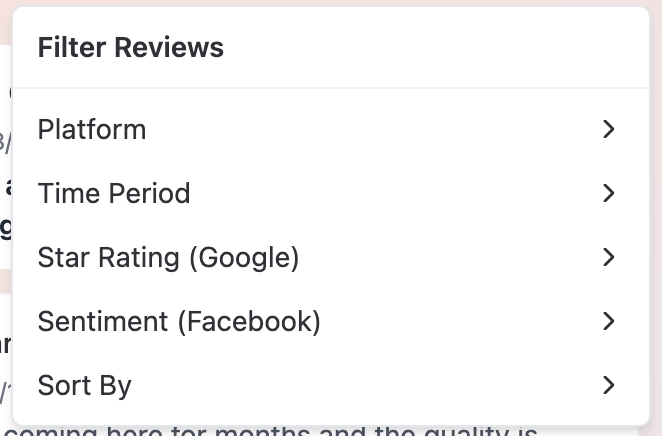
What each filter does
- Platform — All Platforms, Google, or Facebook. Show reviews from just one platform.
- Time Period — All Time, Last Week, Last Month, or Last 3 Months.
- Star Rating (Google) — All Ratings, or a specific rating from 5 Stars down to 1 Star. This applies to Google reviews only, because only Google uses star ratings.
- Sentiment (Facebook) — All Reviews, Positive, or Negative. This applies to Facebook reviews only, because Facebook uses thumbs-up/thumbs-down recommendations instead of stars.
- Sort By — Newest First, Oldest First, Highest Rating, or Lowest Rating.
Why star ratings and sentiment don't mix
Star ratings exist only on Google, and Positive/Negative sentiment exists only on Facebook. That means:
- A star-rating filter combined with Platform: Facebook will show an empty list — no Facebook review has a star rating.
- A sentiment filter combined with Platform: Google will also come up empty.
If your list suddenly looks empty, this combination is the most common reason.
Reset your filters
- Click Clear All at the top of the filter menu to remove every active filter at once.
- If your filters produce no results, the page shows No reviews match your filters with a Reset Filters button — clicking it does the same thing.
Load more reviews
The list doesn't show everything at once. Scroll to the bottom and click Show More to load the next batch (it briefly shows Loading... while fetching).
Tips
- Filters work on the reviews already loaded on the page. The Time Period, Star Rating, Sentiment, and Sort By options narrow down what's currently in your list — so if you're looking for older reviews, click Show More a few times first so there's more to filter through. Switching Platform or tabs fetches a fresh list.
- A good weekly habit: filter by Lowest Rating with Sort By: Newest First to catch recent unhappy customers before their reviews sit unanswered.
- Red dot on the funnel icon? You have a filter active. If the list looks incomplete, clear your filters before assuming reviews are missing.