Deleting or Changing a Review Reply
Made a typo, or want to rewrite an answer? You can delete a review reply from Qrese — and because each review only allows one reply, deleting is also how you "edit": delete the old reply, then send a new one.
Before you start
- Open the Reviews page and make sure the correct location is selected in the location selector — you can only manage replies for reviews that belong to the selected location.
- Find the review with the reply you want to remove. Answered reviews live under the Responded tab, and the reply appears as a red bubble under the review text.
Delete a reply
- 1. Open the review with the existing reply.
- 2. Click Options under the reply bubble.
- 3. In the Response options menu, click Delete response.
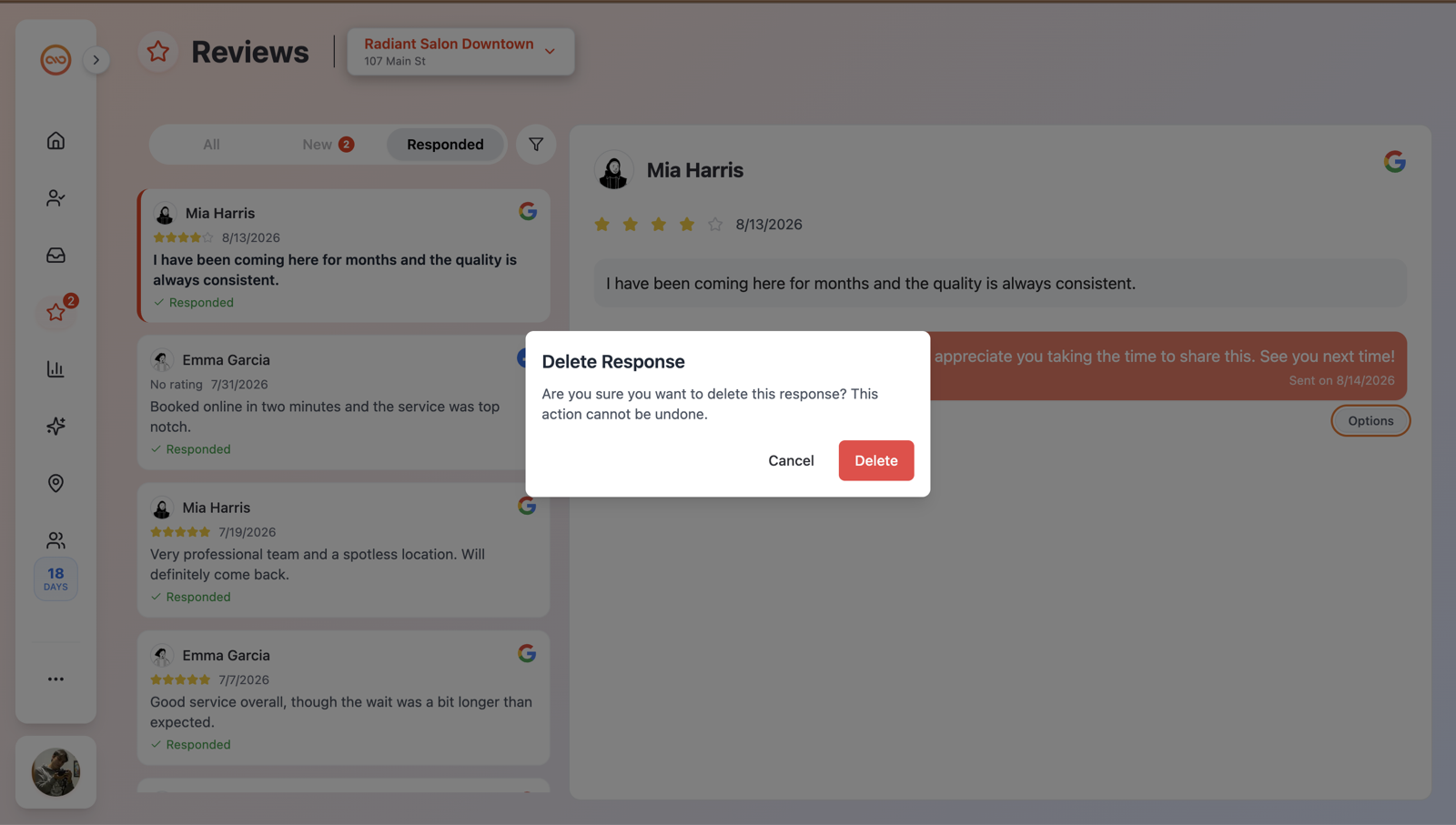
- 4. A confirmation dialog titled Delete Response appears: "Are you sure you want to delete this response? This action cannot be undone."
- 5. Click Delete to confirm (the button shows Deleting... while it works), or Cancel to keep the reply.
What happens on each platform
Google and Facebook handle deletion differently, so Qrese does too:
- Google reviews: The reply is completely removed from your Google Business Profile. The review goes back to the New tab in Qrese, ready for a fresh answer.
- Facebook reviews: Facebook doesn't allow a reply to be deleted outright, so Qrese blanks out the reply text instead. Customers no longer see your original message.
Re-reply after deleting
Once the old reply is gone, the review can be answered again:
- 1. Open the review (for Google reviews, look on the New tab).
- 2. Type your new response in the Write your response here... box — or use the AI button to generate a draft.
- 3. Click the red send button.
Troubleshooting and tips
- Deletion can't be undone. If you might want the old wording later, copy the text somewhere before deleting.
- "Review does not belong to the specified location." This means the review you're trying to change belongs to a different location than the one currently selected. Switch to the right location in the location selector and try again.
- The delete didn't seem to work? If the reply is still showing after a moment, refresh the page and try once more.
- Think before replacing a reply. Customers may have already read (and been notified about) your original response, so frequent edits to public replies can look inconsistent.